Explore Go’s foundational elements with Basic Constructs & Data Types, mastering the essentials for efficient and robust programming
Basics 🔗
Go files are name filename.go or filename_type.go
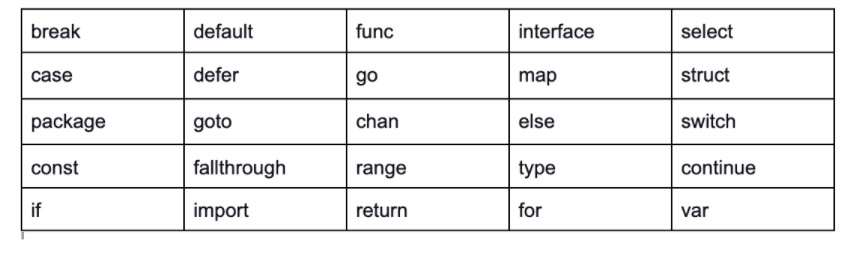
Some keywords are reserved in Go
Go has a set of 36 predeclared identifiers
| append | float64 | println |
| bool | imag | real |
| byte | int | recover |
| cap | int8 | int |
| close | int16 | int8 |
| complex64 | int32 | int16 |
| complex128 | int64 | int32 |
| copy | make | int64 |
| delete | new | uint |
| error | nil | uint8 |
| false | panic | uint16 |
| float32 | uint32 | |
| uint64 |
Blank Identifier - Go also has a blank identifier _ used to declare any variable of any type but it is discarded immediately after use.
Anonymous - Some functions can even have no names.
Import Functionality 🔗
import "fmt"
import "os"

// or

import "fmt"; import "os"

//or

import (
  "fmt"
  "os"
)

// A package can also be given an Alias

import fm "fmt"
Packages 🔗
Every Go file belongs to only one package whereas one package can comprise many different Go files.
Functions 🔗
Simple function -
func functionName()
A few rules:
- The main function starts first
- Func main has no arguments or return values
- After every parameter, there must be a type
func func_Name(param1 type1, param2 type2, ...){
  ...
}

// Params can also share the same type

func func_Name(param1, param2 type1){
  ...
}
If it’s returning a type - () type1 { .... } or () ret1 type1 { .... }
If it’s returning multiple types - () (ret1 type 1, ret2 type2) {....}
Small functions can be written in one line like - func Sum(a, b int) int { return a + b }
Data Types 🔗
Go is a statically typed language. Means the compiler can infer the type of the variable whether it’s indicated or not.
| Types | Examples |
|---|---|
| elementary (or primitive) | int, float, bool, string |
| structured (or composite) | struct, array, slice, map, channel |
| interfaces | They describe the behavior of a type. |
A variable is declared as var var_name var_type
A function type is the return type
We can also have user-defined type with aliases
type alias_name int

var a alias_name = 5
If you have more than one type and you’d like to have aliases
type (
  IZ int
  FZ float32
  STR string
)
Go doesn’t automatically convert types unless done manually
To convert a type, do - valueOfTypeB = typeB(valueOfTypeA) || 3 = int(3.2). This is called type casting
Constants 🔗
A value that cannot be changed by the program is called a constant. In Go, a constant can be defined using the keyword const as const identifier [type] = value
By convention, constants are written in uppercase - const INCH = 2.54
Also, a constant’s value should be known at compile time according to design principles.
Multiple assignments (untyped) - const BEEF, TWO, C = "meat", 2, "veg"
Multiple assignments (typed) - const MONDAY, TUESDAY, WEDNESDAY, THURSDAY, FRIDAY, SATURDAY int = 1, 2, 3, 4, 5, 6
Enumerations 🔗
Constant be used to create aliases that hold a value.
const (
  UNKNOWN = 0
  FEMALE = 1
  MALE = 2
)
We can also enumerate with - iota
const (
  UNKNOWN = iota
  FEMALE = iota
  MALE = iota
)

// same as

const (
  UNKNOWN = iota
  FEMALE
  MALE
)
The first use of iota is 0, then 1, then 0 …..
You can also give enumeration a type name
type Gender int
const (
  UNKNOWN Gender = iota
  FEMALE
  MALE
)
Variable 🔗
The naming of variables follows the camelCasing rules. If it has to be exported, it has to start with a capital letter.
Declaration - var number int = 5 or var number = 5
When we omit the type, using the keyword var is extra. We can write the same line of code using the := assignment operator. So, number := 5. The only exception to this is that it can only be used inside functions and not the package.
Scope of Variables 🔗
Global scope A.K.A package scope is available in all source files of a package. They can be changed anywhere in the code.
Local scope is defined inside of a function. They can only be changed inside the code.
Printing 🔗
The fmt package which uses Println also has the Printf function, which uses a format-string as its first argument - func Printf(format string, list of variables to be printed)
fmt.Printf("Original Value of number: %d\n",number)
We used %d because number is an integer. %t prints boolean, %s prints string and so on. \n prints a new line
Elementary Types 🔗
The three main elementary types in Go are:
- Boolean
- Numeric
- Character
Unless you have a good reason to, stick to the following types:
boolstringintuint32byterunefloat64complex128
Read more on types
Operators 🔗
Built-in operators in Go: Arithmetic, Logical, and Bitwise.
Arithmetic Operators 🔗
Binary operators +, -, *, and / that exist for both integers and floats
Logical Operators 🔗
The following are logical operators present in Go: ==, !=, <, > , <=, >=
Boolean Logical Operators
- AND operator (
&&) - OR operator (
||) - NOT operator (
!)
Bitwise operators 🔗
They are used to manipulate individual bits of integer values. Go supports the following bitwise operators:
Bitwise AND (&):
- The bitwise AND operator compares each bit of the first operand to the corresponding bit of the second operand. If both bits are 1, the resulting bit is 1; otherwise, it’s 0.
result := 5 & 3 // Binary: 0101 & 0011 = 0001
fmt.Println(result) // Output: 1
Bitwise OR (|):
- The bitwise OR operator compares each bit of the first operand to the corresponding bit of the second operand. If at least one bit is 1, the resulting bit is 1; otherwise, it’s 0.
result := 5 | 3 // Binary: 0101 | 0011 = 0111
fmt.Println(result) // Output: 7
Bitwise XOR (^):
- The bitwise XOR (exclusive OR) operator compares each bit of the first operand to the corresponding bit of the second operand. If the bits are different, the resulting bit is 1; if they are the same, the resulting bit is 0.
result := 5 ^ 3 // Binary: 0101 ^ 0011 = 0110
fmt.Println(result) // Output: 6
Bitwise NOT (~):
- The bitwise NOT operator inverts each bit of the operand. It turns 1s into 0s and 0s into 1s.
result := ^5 // Binary: ^0101 = 1010
fmt.Println(result) // Output: -6 (in 2's complement form)
Left Shift («):
- The left shift operator shifts the bits of the left operand to the left by a specified number of positions. The vacant positions on the right are filled with zeros.
result := 5 << 1 // Binary: 0101 << 1 = 1010
fmt.Println(result) // Output: 10
Right Shift (»):
- The right shift operator shifts the bits of the left operand to the right by a specified number of positions. The vacant positions on the left are filled based on the sign bit (for signed integers).
result := 5 >> 1 // Binary: 0101 >> 1 = 0010
fmt.Println(result) // Output: 2
Bitwise operators are often used in low-level programming, such as device drivers or cryptographic algorithms, where fine-grained control over individual bits is required.
Strings 🔗
Two kinds of string literals exist:
- Interpreted strings
- Raw strings
Interpreted Strings
"\n" // represents a newline
"\r" // represents a carriage return
"\t" // represents a tab
"\u" // represents Unicode characters
"\U" // also represents Unicode characters
Raw Strings
`This is a raw string \n`
The length of a string str (the number of bytes) is given by the len() function
len(str)
Concatenation of strings 🔗
Two strings s1 and s2 can be made into one string s with:
s := s1 + s2
HasPrefix - strings.HasPrefix(s, prefix string) bool
HasSuffix - strings.HasSuffix(s, suffix string) bool
package main

import (
    "fmt"
    "strings"
)

func main() {
    var str string = "This is an example of a string"
    fmt.Printf("T/F? \nDoes the string \"%s\" have prefix %s? ", str, "Th")
    fmt.Printf("\n%t\n\n", strings.HasPrefix(str, "Th"))    // Finding prefix

    fmt.Printf("Does the string \"%s\" have suffix %s? ", str, "ting")
    fmt.Printf("\n%t\n\n", strings.HasSuffix(str, "ting"))  // Finding suffix
}
Contains - strings.HasSuffix(s, suffix string) bool
Index - strings.Index(s, str string) int
LastIndex - strings.LastIndex(s, str string) int
IndexRune - strings.IndexRune(s string, ch int) int.
Replace - strings.Replace(str, old, new string, n int)
Count - strings.Count(s, str string) int
Repeat - strings.Repeat(s, count int) string
ToLower - strings.ToLower(s) string
ToUpper - strings.ToUpper(s) string
package main
import (
    "fmt"
    "strings"
)

func main() {
    var orig string = "Hey, how are you George?"
    var lower string
    var upper string
    fmt.Printf("The original string is: %s\n", orig)
    lower = strings.ToLower(orig)     // changing to lower case
    fmt.Printf("The lowercase string is: %s\n", lower)
    upper = strings.ToUpper(orig)     // changing to upper case
    fmt.Printf("The uppercase string is: %s\n", upper)
}
TrimSpace - strings.TrimSpace(s)
To trim a specific string str from a string s, use:
strings.Trim(s, str)
Split String on whitespaces - strings.Fields(s)
Split String on separator - strings.Split(s, sep). The separator can be :,;,,,-
Join over a slice - strings.Join(sl []string, sep string)
Read String - strings.NewReader(str)
Conversion to and from a string 🔗
Package strconv contains a few variables to calculate the size in bits of the int of the platform on which the program runs:
strconv.IntSize
Converting a variable of a certain type to a string will always succeed. For converting from numbers, we have the following functions:
strconv.Itoa(i int) string
It returns the decimal string representation of i. Next, we have:
strconv.FormatFloat(f float64, fmt byte, prec int, bitSize int) string
It converts the 64-bit floating-point number f to a string, according to the format fmt (can be ‘b’,‘e’, ‘f’ or ‘g’), precision prec, with bitSize being 32 for float32 or 64 for float64.
For converting to numbers, we have the following functions:
strconv.Atoi(s string) (i int, err error)
It converts to an int. Second, we have:
strconv.ParseFloat(s string, bitSize int) (f float64, err error)
It converts to a 64-bit floating-point number
As can be seen from the return-type these functions will return 2 values: the converted value (if possible) and the possible error. So, when calling such a function, the multiple assignment form will be used:
val, err = strconv.Atoi(s)
Converting a string to another type will not always be possible (as in the case of the functions Atoi and ParseFloat above). Therefore, a runtime error is thrown: parsing "...": invalid argument.
Time and Dates 🔗
t := time.Now()
fmt.Printf("%02d.%02d.%4d\n", t.Day(), t.Month(), t.Year()) // e.g.: 29.10.2019
func (t Time) Format(s string) string
t := time.Now().UTC()
fmt.Println(t.Format("02 Jan 2006 15:04"))// e.g: 29 Oct 2019 11:00
Pointers 🔗
package main
import "fmt"

func main(){
    var i1 = 5
    fmt.Printf("An integer: %d, it's location in memory: %p\n", i1, &i1)
}

// An integer: 5, it's location in memory: 0xc82000a270
intP = &i1
So, intP stores the memory address of i1 which means it points to the location of i1. In other words, it references the variable i1.
👉🏽 See all notes in this series